Wednesday, April 3, 2024

is Required & Validation message in an adaptive card

The parameter to make the text field mandatory in adaptive card is "isRequired", pls try modify the required parameter with the below one:

{

"type": "Input.Text",
"id": "defaultInputId",
"placeholder": "enter comment",
"maxLength": 500,
"isRequired": true,
"errorMessage": "Comment is required"
},

Monday, April 1, 2024

Adaptive card Post for ATC communication

How to add Hyperlink to adaptive cards

https://stackoverflow.com/questions/67618020/how-to-add-hyperlink-to-adaptive-cards

{ "type": "TextBlock",
"text": "Check out [Adaptive Cards](https://adaptivecards.io)"
}

https://adaptivecards.io/explorer/RichTextBlock.html

https://adaptivecards.io/explorer/TextBlock.html

{

"type": "AdaptiveCard",
"body": [
{
"type": "TextBlock",
"size": "medium",
"weight": "bolder",
"text": "Your Response Matters",
"style": "heading",
"wrap": true
},
{
"type": "TextBlock",
"text": "",
"color": "Attention",
"style": "heading",
"wrap": true
},
{
"type": "TextBlock",
"size": "medium",
"weight": "bolder",
"text": "Please refer to below link and take appropriate action",
"style": "heading",
"wrap": true
},

{ "type": "TextBlock",
"text": "Check out [Adaptive Cards](https://adaptivecards.io)"
}

],

"actions": [
{
"type": "Action.ShowCard",
"title": "Keep Rule",
"card": {
"type": "AdaptiveCard",
"body": [
{
"type": "Input.Date",
"label": "Enter the rule expiry date",
"id": "acExpiryDate1"
},
{
"type": "Input.Text",
"id": "acKeepRuleComment",
"isMultiline": true,
"label": "Justification"
}
],
"actions": [
{
"type": "Action.Submit",
"id": "keep",
"title": "OK"
}
],
"$schema": "http://adaptivecards.io/schemas/adaptive-card.json"
}
},


{
"type": "Action.ShowCard",
"title": "Discard Rule",
"card": {
"type": "AdaptiveCard",
"body": [
{
"type": "Input.Text",
"id": "acDiscardComment",
"isMultiline": true,
"label": "Add a comment"
}
],
"actions": [
{
"type": "Action.Submit",
"id": "discard",
"title": "OK"
}
],
"$schema": "http://adaptivecards.io/schemas/adaptive-card.json"
}
},

{
"type": "Action.ShowCard",
"title": "Make Rule Permanent",
"card": {
"type": "AdaptiveCard",
"body": [
{
"type": "Input.Date",
"label": "Enter the rule expiry date",
"id": "acExpiryDate"
},
{
"type": "Input.Text",
"id": "acMakeRulePermanentComment",
"isMultiline": true,
"label": "Justification"
}
],
"actions": [
{
"type": "Action.Submit",
"id": "permanent",
"title": "OK"
}
],
"$schema": "http://adaptivecards.io/schemas/adaptive-card.json"
}
},

{
"type": "Action.ShowCard",
"title": "Not sure, setup a quick call with NSA team",
"card": {
"type": "AdaptiveCard",
"body": [
{
"type": "Input.Text",
"id": "acNotSureComment",
"isMultiline": true,
"label": "Please provide your concerns on this rule?"
}
],
"actions": [
{
"type": "Action.Submit",
"id": "NotSure",
"title": "OK"
}
],
"$schema": "http://adaptivecards.io/schemas/adaptive-card.json"
}
},

{
"type": "Action.ShowCard",
"title": "Redirect to alternate POC",
"card": {
"type": "AdaptiveCard",
"body": [
{
"type": "Input.Text",
"id": "acEmailID",
"isMultiline": false,
"label": "Email ID"
}
],
"actions": [
{
"type": "Action.Submit",
"id": "Redirect",
"title": "OK"
}
],
"$schema": "http://adaptivecards.io/schemas/adaptive-card.json"
}
}

],
"$schema": "http://adaptivecards.io/schemas/adaptive-card.json",
"version": "1.4"
}


I managed to fix the problem by addingthe textblock  { "type": "TextBlock", "text": "Check out [Adaptive Cards](https://adaptivecards.io)" } in the Card Paylod Editor on https://adaptivecards.io/designer/ .

https://powerusers.microsoft.com/t5/Building-Flows/adding-hyperlinks-to-adaptive-card-message/td-p/645215

https://powerusers.microsoft.com/t5/Building-Flows/Adaptive-Card-Error-Invalid-Json/m-p/503222#M62924

Monday, March 4, 2024

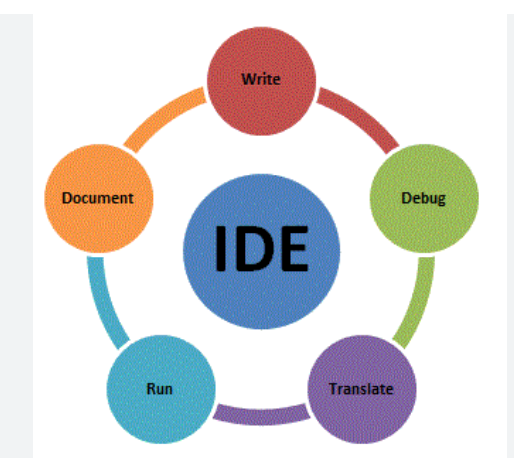
Introduction of Preferred Integrated Development Environments (IDEs)

Getting Started with IDE

Dear Developer, a preferred set of industry-leading, fully-managed Integrated Development Environments (IDEs)—saving developers time and ensuring easy access to the latest GenAI-based capabilities.  


  • VS Code 
  • JetBrains 
    • IntelliJ 
    • DataGrip 
    • PyCharm 
    • GoLand 
    • WebStorm 
    • Rider 
    • Rubymine 
    • CLion 
    • PhpStorm 
  • Visual Studio 
  • Xcode 


Visual Studio Code
https://code.visualstudio.com/download

IDE

Language/ Technology

Supported Platforms

  • Visual Studio Code
  • JavaScript
  • TypeScript
  • Java
  • Python
  • PHP
  • C#
  • C++
  • Go
  • Perl
  • Ruby
  • R
  • SQL
  • Swift
  • Shell Script
  • Markdown
  • HTML
  • CSS
  • Sass
  • JSON
  • and more....
  • Windows
  • Mac Intel
  • Mac Silicon
https://code.visualstudio.com/download
IntelliJ 
https://www.jetbrains.com/idea/download/
DataGrip 
https://www.jetbrains.com/datagrip/
PyCharm 
https://www.jetbrains.com/pycharm/
WebStorm  
https://www.jetbrains.com/webstorm/
Rider
https://www.jetbrains.com/rider/
Rubymine 
https://www.jetbrains.com/ruby/
CLion 
https://www.jetbrains.com/clion/download/
PhpStorm 
https://www.jetbrains.com/phpstorm/

Visual Studio 
https://visualstudio.microsoft.com/

Xcode is an integrated development environment (IDE) created by Apple Inc. for developing software applications for iOS, iPadOS, macOS, WatchOS, tvOS and beyond. It includes a suite of tools that developers can use to write, debug, and test software, as well as tools for managing project files and resources

https://developer.apple.com/xcode/


hope it helps you!

Reference
https://www.temok.com/blog/top-20-javascript-ide-source-code-editors/
https://theteacher.info/websites/gcse_comp/WebPages/A451_CompSys/217_Programming/ProgLang/f/f.html


Tuesday, February 27, 2024

400, 403, 405, 415 or XSRF check failed when sending POST to custom rest endpoint + Power automate Desktop

I need to get list of projects issues from Jira using custom rest endpoint in power automate desktop (that it (API) works fine when I call it from postman), but when I submit this dialog, it appears "XSRF check failed".


I am using the basic AUTH to get issue using the API in postman and it created successfully but when I do the same using the invoke webservice action - it gives me 403 XSRF check failed
https://domain/rest/api/latest/search

  • Adding headers: { 'X-Atlassian-Token': 'nocheck' }

  • JQL query as per the requirement in request body - Screenshot captured below

  • Click advanced setting.

    Uncheck this option if it is checked - Screenshot captured below

  • Change User Agents Header - Power Automate Desktop Screenshot captured below 
  • Whitelist/Allowlist the origin domain in Jira. When you send a request to the Jira API your browser automatically populates the "origin" header. You need to add that value to the whitelist/allowlist in Jira. -> See here: https://confluence.atlassian.com/adminjiraserver073/configuring-the-allowlist-1014667631.html Type "Domain" should work.

Resolution

To call protected APIs from external systems you can add the X-Atlassian-Token header to each request, setting the value to no-check. Adding this header to a request bypasses the server-side XSRF check and allows the request to be fulfilled and set the User Agent : "PostmanRuntime/7.30.0"

Regarding getting issues from JIRA using the action "Invoke Web Service". You can solve the issue "XSRF Check Failed" by adding following headers:

X-Atlassian-Token: nocheck
Authorization: Basic <base64>
User-Agent: PowerAutomateDesktop/1.0.0 OR User-Agent: PostmanRuntime/7.30.0


Hope this helps!

Building Secure Azure AI Foundry Agents with Managed Identity

  The credential problem nobody wants to own Every team that connects an Azure AI Foundry agent to Microsoft Graph, SharePoint, Outlook, or...